Android · App Walkthroughs · Featured
100 Rooms Walkthrough, Cheats & Guide - 100 Rooms Level 1-50
This is a full 100 Rooms Walkthrough for Android with cheats, answers and game solutions to all 100 Rooms Levels 1-50. 100 Rooms is a free app and escape game for Android by MPI Games, the developer of 100 Doors. Use clues found in different rooms to solve the puzzle, unlock the door and escape from the room.
100 Rooms Walkthrough, Cheats & Guide
Download 100 Rooms
100 Rooms Walkthrough Level 1
- Go to the room with the desk.
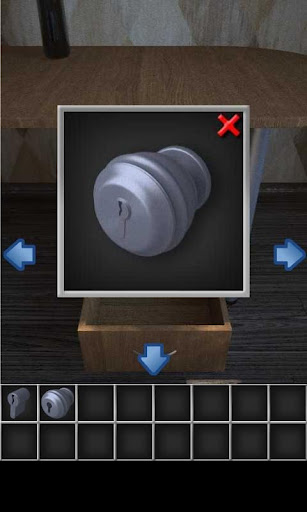
- Tap the drawers to zoom in and tap to open the middle drawer.
- Tap to take the doorknob.
- Go to the room with the window.
- Move the plant and tap to take the keyhole.
- Combine the doorknob and the keyhole, then drag it onto the door to open the door.
Next Page >
This is a full 100 Rooms Walkthrough for Android with cheats, answers and game solutions to all 100 Rooms Levels 1-50. 100 Rooms is a free app and escape game for Android by MPI Games, the developer of 100 Doors. Use clues found in different rooms to solve the puzzle, unlock the door and escape from the room.
100 Rooms Walkthrough, Cheats & Guide
Download 100 Rooms
100 Rooms Walkthrough Level 2
- Go to the room with the shelves.
- Zoom in on the shelf and tap to take the brown handle.
- Move to view the window and tap to take the window handle.
- Move to the room with the dresser and zoom in on the pot on top of the dresser.
- Tap to take the saw blade inside the pot.
- Combine all three items by double tapping the window handle, tap the saw then the window handle to combine the two. Tap the brown handle then the window handle to combine the three.
- Go back to the front door and use the combined saw, window blind, and brown handle to saw the lock off the door.
Next Page >
This is a full 100 Rooms Walkthrough for Android with cheats, answers and game solutions to all 100 Rooms Levels 1-50. 100 Rooms is a free app and escape game for Android by MPI Games, the developer of 100 Doors. Use clues found in different rooms to solve the puzzle, unlock the door and escape from the room.
100 Rooms Walkthrough, Cheats & Guide
Download 100 Rooms
100 Rooms Walkthrough Level 3
- Go to the room with the desk and zoom in on the trash.
- Tap to take the cardboard box.
- Move to the room with the window zoom in on the window.
- Tap to take the knife.
- Open the cardboard box by double tapping on it in your inventory to zoom in. Tap the knife then the cardboard box to open it.
- Move to the room with the chair and press the chair to move it into the middle of your screen.
- Zoom in on the light and drag the light bulb in your inventory into the light fixture.
- Zoom out and you will see the code for the door on the wall.
- Return to the front door and enter the code (783461).
Next Page >
This is a full 100 Rooms Walkthrough for Android with cheats, answers and game solutions to all 100 Rooms Levels 1-50. 100 Rooms is a free app and escape game for Android by MPI Games, the developer of 100 Doors. Use clues found in different rooms to solve the puzzle, unlock the door and escape from the room.
100 Rooms Walkthrough, Cheats & Guide
Download 100 Rooms
100 Rooms Walkthrough Level 4
- Zoom in on the axe in the upper right corner of the door.
- Tap to take the axe.
- Move to the window area and zoom in on the window.
- Tap to take the power cord.
- Move to the sink area and zoom in on the water heater.
- Place the power cord into the socket.
- Zoom back out and zoom in on the sink.
- Turn on the hot water.
- Zoom out and there will be a code on the mirror.
- Go to the wooden boards and use the axe to break the wooden boards.
- Zoom in on the safe and enter the code from the mirror (514796).
- Take the key inside the safe and use it to open the door.
Next Page >
This is a full 100 Rooms Walkthrough for Android with cheats, answers and game solutions to all 100 Rooms Levels 1-50. 100 Rooms is a free app and escape game for Android by MPI Games, the developer of 100 Doors. Use clues found in different rooms to solve the puzzle, unlock the door and escape from the room.
100 Rooms Walkthrough, Cheats & Guide
Download 100 Rooms
100 Rooms Walkthrough Level 5
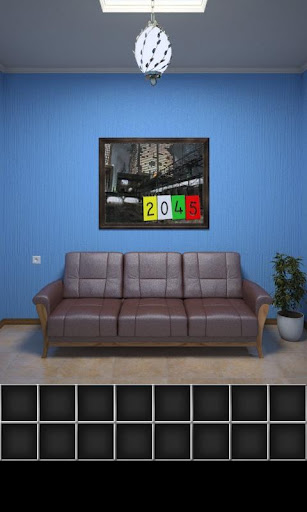
- Remember the numbers above the couch (2045).
- Go to the brown cabinet and zoom in. You will see a duck shooting game.
- Tap two yellow ducks, four green ducks, then five red ducks.
- A box will pop out. Open the box and tap to take the hammer.
- Go back to the couch and use the hammer to smash the artwork above the couch. This is the final clue revealing directions.
- Go to the front door and tap the arrows in this order: left once, right three times, left twice.
Next Page >
##
This is a full 100 Rooms Walkthrough for Android with cheats, answers and game solutions to all 100 Rooms Levels 1-50. 100 Rooms is a free app and escape game for Android by MPI Games, the developer of 100 Doors. Use clues found in different rooms to solve the puzzle, unlock the door and escape from the room.
100 Rooms Walkthrough, Cheats & Guide
Download 100 Rooms
100 Rooms Walkthrough Level 6
- Go to the pipes.
- Zoom in on the bucket and tap to take the bucket.
- Zoom out and in on the pipes to the right.
- Take the bucket and pour it into the glass tube to make the key float to the top.
- Tap to take the key.
- Go to the front door and zoom in on the wooden planks in the left corner.
- Tap to take the wooden plank with numbers on it.
- Go to the bookshelf and zoom in.
- Take the slanted ivory book in the middle shelf.
- Zoom out and in on the dresser with the symbol lock.
- Tap the symbols on the lock in this order - top right, top left, top right, bottom left, bottom right.
- Take the teddy bear inside the dresser and go to the couch area.
- Zoom in on the painting above the couch and place the teddy bear on the couch in the painting.
- Take the key and use it to open the front door.
Next Page >
This is a full 100 Rooms Walkthrough for Android with cheats, answers and game solutions to all 100 Rooms Levels 1-50. 100 Rooms is a free app and escape game for Android by MPI Games, the developer of 100 Doors. Use clues found in different rooms to solve the puzzle, unlock the door and escape from the room.
100 Rooms Walkthrough, Cheats & Guide
Download 100 Rooms
100 Rooms Walkthrough Level 7
- Go to the window and zoom in on the bookshelf.
- Take the red book on the top shelf.
- Open the book and find the items in that order 1 - chair, 2 - clock, 3 - teddy bear, 4 - Planks, 5 - Mailbox, 6 - Book.
- Notice which number goes with each item. The back of the chair says IX, or 9 in roman numerals. The clock reads 8. There is 1 teddy bear. There are 4 planks on the wall. The mailbox has a number 7 on it. You have 1 book.
- Go to the safe and zoom in on the safe to enter the code 981471.
- Take the pliers inside the safe.
- Go back to the window and zoom in on the bookshelf.
- Cut the wire poking out from the wooden planks.
- Go back to the mailbox and zoom in.
- Double tap the wire in your inventory and use the pliers to bend the wire.
- Put the bent wire into the slot on the mailbox to get the key.
- Use the key to open the door.
Next Page >
This is a full 100 Rooms Walkthrough for Android with cheats, answers and game solutions to all 100 Rooms Levels 1-50. 100 Rooms is a free app and escape game for Android by MPI Games, the developer of 100 Doors. Use clues found in different rooms to solve the puzzle, unlock the door and escape from the room.
100 Rooms Walkthrough, Cheats & Guide
Download 100 Rooms
100 Rooms Walkthrough Level 8
- Go to the desk and zoom in.
- Tap to take a sheet of paper and a pencil.
- Go to the chair and zoom in.
- Tap to take the long hook under the chair.
- Zoom out and in on the blank painting.
- Put the sheet of paper on the blank painting and then press the pencil on the sheet of paper to reveal a number code.
- Go to the window and zoom in on the window.
- Use the long hook to open the left window and take the screwdriver.
- Go back to the desk and zoom in on the painting.
- Use the screwdriver to unscrew the screws and reveal a safe.
- Enter the code 592351 to open the safe.
- Take the key inside the safe and use it to open the door.
Next Page >
This is a full 100 Rooms Walkthrough for Android with cheats, answers and game solutions to all 100 Rooms Levels 1-50. 100 Rooms is a free app and escape game for Android by MPI Games, the developer of 100 Doors. Use clues found in different rooms to solve the puzzle, unlock the door and escape from the room.
100 Rooms Walkthrough, Cheats & Guide
Download 100 Rooms
100 Rooms Walkthrough Level 9
- Go to the room with the window and heater.
- Zoom in on back of the heater by pressing on the heater's right side.
- Tap to take the skinny pole behind the heater.
- Go to the bookshelf and press the box on the right to move it towards the bookshelf.
- Zoom in on the safe above the bookshelf and enter the code: green, red, red, blue, green, blue, red (the colors of the fish on the shelf from left to right).
- Take the hook inside the safe and combine it with the skinny pole in your inventory.
- Go to the desk and zoom in on the green tank.
- Use the pole/hook to collect the key inside the tank and use the key to open the door.
Next Page >
This is a full 100 Rooms Walkthrough for Android with cheats, answers and game solutions to all 100 Rooms Levels 1-50. 100 Rooms is a free app and escape game for Android by MPI Games, the developer of 100 Doors. Use clues found in different rooms to solve the puzzle, unlock the door and escape from the room.
100 Rooms Walkthrough, Cheats & Guide
Download 100 Rooms
100 Rooms Walkthrough Level 10
- Go to the desk and zoom in on the books underneath the desk.
- Tap to take the lockpick handle.
- Go to the door and zoom in on the chair.
- Tap to take the other part of the lockpick on the chair.
- Combine the two parts of the lockpick.
- Zoom out and in on the drawer of the desk.
- Use the lockpick on the keyhole of the drawer to open it and tap to take the flashlight in the drawer.
- Go to the couch and zoom in on the right light.
- Tap the lightbulb to take it out of the light fixture.
- Combine the lightbulb and the flashlight.
- Zoom out and in underneath the couch to find a number code.
- Go to the door and zoom in on the code panel. Enter the code 491777.
100 Rooms Walkthrough Level 1-10 100 Rooms Walkthrough Level 11-20
Some people searched for:
- 100 Rooms 7
- 100 Rooms 13
- 100 Rooms 12
- 100 Rooms 1
- 100 Rooms 10
- 100 Rooms 8
- 100 Rooms 15
- 100 Room
Next Page >
This is a full 100 Rooms Walkthrough for Android with cheats, answers and game solutions to all 100 Rooms Levels 1-50. 100 Rooms is a free app and escape game for Android by MPI Games, the developer of 100 Doors. Use clues found in different rooms to solve the puzzle, unlock the door and escape from the room.
100 Rooms Walkthrough, Cheats & Guide
Download 100 Rooms
This is a full 100 Rooms Walkthrough for Android with cheats, answers and solutions to all 100 Rooms Levels 1-20.
100 Rooms Walkthrough, Cheats & Guide - 100 Rooms Level 1-20
100 Rooms Walkthrough Level 1-10 100 Rooms Walkthrough Level 11-20 100 Rooms Walkthrough Level 21-30
100 Rooms Waklthough Level 11
- Go to the room with the machines and safe.
- Zoom in on the safe and pick up the coins to the left of the safe.
- Zoom out and in on the trash can.
- Take the spray bottle inside the trash can.
- Go to the window and zoom in on the cake.
- Pick up the spoon in the cup and the knife behind the cake.
- Put the coins on the spoon and go to the candle.
- Place the spoon and coins on the candle to melt the coins.
- Use the spray bottle on the candle to reveal the number code for the safe.
- Go to the safe and enter the code 451279.
- Take the first half of the key mold that is inside the safe.
- Go back to the cake and use the knife on the cake to get the second half of the key mold.
- Combine the key molds.
- Zoom in on the key mold and use the spoon with the melted coins on the key mold to make the key.
- Use the key to open the door.
Next Page >
This is a full 100 Rooms Walkthrough for Android with cheats, answers and game solutions to all 100 Rooms Levels 1-50. 100 Rooms is a free app and escape game for Android by MPI Games, the developer of 100 Doors. Use clues found in different rooms to solve the puzzle, unlock the door and escape from the room.
100 Rooms Walkthrough, Cheats & Guide
Download 100 Rooms
100 Rooms Walkthrough Level 12
- Go to the bathroom and zoom in on the opening in the top left part of the ceiling.
- Tap the opening to take part of the plunger.
- Go to the sink and zoom in underneath the sink.
- Tap to take the plunger stick.
- Zoom out and in on the cabinet to the right of the sink.
- Tap the notebook to reveal a clue, which tells you where and how many times to hit the tiles with the hammer to get the key to the safe.
- Go to the shelves and zoom in next to the safe.
- Tap to take the hammer.
- Go to the sink and zoom in on the sink.
- Combine the two parts of the plunger.
- Use the plunger in the sink and take the first key for the safe.
- Go to the bathtub and zoom in on the side of the bathtub.
- Hit the tiles on the side of the bathtub with the hammer in this order - row 3 column 5 3 times, row 2 column 1 2 times, row 1 column 6 4 times.
- One of the tiles will pop out and inside will be the second key to the safe.
- Zoom in on the safe and insert the two keys.
- Take the key inside the safe and use it to open the door.
Next Page >
This is a full 100 Rooms Walkthrough for Android with cheats, answers and game solutions to all 100 Rooms Levels 1-50. 100 Rooms is a free app and escape game for Android by MPI Games, the developer of 100 Doors. Use clues found in different rooms to solve the puzzle, unlock the door and escape from the room.
100 Rooms Walkthrough, Cheats & Guide
Download 100 Rooms
100 Rooms Walkthrough Level 13
- Tap the colored picture frames in the order shown on the door.
- Start with the room with 6 frames and tap orange, pink, blue. Then the room with 4 frames tap green, light blue. Then the room with 12 frames tap square purple, lime green, red. Then the room with 16 frames tap orange on the bottom level. Then the room with 7 frames tap rust, purple, orange. The door will open.
Next Page >
This is a full 100 Rooms Walkthrough for Android with cheats, answers and game solutions to all 100 Rooms Levels 1-50. 100 Rooms is a free app and escape game for Android by MPI Games, the developer of 100 Doors. Use clues found in different rooms to solve the puzzle, unlock the door and escape from the room.
100 Rooms Walkthrough, Cheats & Guide
Download 100 Rooms
100 Rooms Walkthrough Level 14
- Find the values of Y and X.
- Y is next to 9 containers, so y=9.
- X = A x B. Zoom in on the table underneath the equation. There are apples and bananas.
- Count all the apples and bananas in the room. There are 25 bananas and 4 apples. 25 x 4 = 100, so X = 100.
- Go to the keypad and enter 9 for every Y and fill in the blanks so that the equation equals 100.
- 9 blank square 9 + 9 / 9 will open the door.
Next Page >
##
This is a full 100 Rooms Walkthrough for Android with cheats, answers and game solutions to all 100 Rooms Levels 1-50. 100 Rooms is a free app and escape game for Android by MPI Games, the developer of 100 Doors. Use clues found in different rooms to solve the puzzle, unlock the door and escape from the room.
100 Rooms Walkthrough, Cheats & Guide
Download 100 Rooms
100 Rooms Walkthrough Level 15
- Count the number of white items on the table (21).
- Count the objects on each side of the door (one white, one black).
- Count the number of black items on the table (15).
- There are 22 total white objects and 16 total black objects, which equals 38.
- Go to the keypad and enter the code 223816. The door will open.
Next Page >
This is a full 100 Rooms Walkthrough for Android with cheats, answers and game solutions to all 100 Rooms Levels 1-50. 100 Rooms is a free app and escape game for Android by MPI Games, the developer of 100 Doors. Use clues found in different rooms to solve the puzzle, unlock the door and escape from the room.
100 Rooms Walkthrough, Cheats & Guide
Download 100 Rooms
100 Rooms Walkthrough Level 16
- Search for clues to the code for the safe.
- Zoom in on the easel that says 50 - 0.
- Zoom in on the table and the protractor that reads 40.
- Zoom in on the clock on the chair that reads 40.
- Zoom in on the clock on the wall pointed to 6:00.
- Go to the safe and enter this code - Left 50 Right 10 Right 40 Left 10 Left 60 Right 10 Right 40.
Next Page >
This is a full 100 Rooms Walkthrough for Android with cheats, answers and game solutions to all 100 Rooms Levels 1-50. 100 Rooms is a free app and escape game for Android by MPI Games, the developer of 100 Doors. Use clues found in different rooms to solve the puzzle, unlock the door and escape from the room.
100 Rooms Walkthrough, Cheats & Guide
Download 100 Rooms
100 Rooms Walkthrough Level 17
- Move the bat picture to where the snow picture is, and the snow picture to where the bat picture is.
- Tap the door and then tap the symbols in this order - ball, bone, rock, sun, leaf, snow.
Next Page >
This is a full 100 Rooms Walkthrough for Android with cheats, answers and game solutions to all 100 Rooms Levels 1-50. 100 Rooms is a free app and escape game for Android by MPI Games, the developer of 100 Doors. Use clues found in different rooms to solve the puzzle, unlock the door and escape from the room.
100 Rooms Walkthrough, Cheats & Guide
Download 100 Rooms
100 Rooms Walkthrough Level 18
- Tap the shelf next to the bed and you will see zodiacs on a scroll. The water in the image counts as a zodiac so there is Sagittarius, Taurus, Aquarius, Pisces, and Cancer.
- Look at the clock for the number value of each zodiac sign. Sagittarius = 1, Taurus = 8, Aquarius = 11, Pisces = 10, and Cancer = 6.
- Open the safe by entering this code 1811106.
- Take the piece of paper from the safe and hold it against the piece of paper on the door.
- Tap the numbers on the black piece of paper that are outlined by frames that resemble the other piece of paper. 0, 5, blank space on right, 12, 2, blank space on left.
Next Page >
This is a full 100 Rooms Walkthrough for Android with cheats, answers and game solutions to all 100 Rooms Levels 1-50. 100 Rooms is a free app and escape game for Android by MPI Games, the developer of 100 Doors. Use clues found in different rooms to solve the puzzle, unlock the door and escape from the room.
100 Rooms Walkthrough, Cheats & Guide
Download 100 Rooms
100 Rooms Walkthrough Level 19
- The code on the table reads E (East), down arrow, S (South) W (West), up arrow, N (North).
- In the different rooms you will find maps of China, South Pole, America, Australia, and China.
- Tap the piece of paper on the door and tap the animals from each country from ESWN. Bison, rhino, kangaroo, panda, penguin, snake.
Next Page >
This is a full 100 Rooms Walkthrough for Android with cheats, answers and game solutions to all 100 Rooms Levels 1-50. 100 Rooms is a free app and escape game for Android by MPI Games, the developer of 100 Doors. Use clues found in different rooms to solve the puzzle, unlock the door and escape from the room.
100 Rooms Walkthrough, Cheats & Guide
Download 100 Rooms
100 Rooms Walkthrough Level 20
- There are two rooms with the same six pictures that mirror each other.
- Go to the big mural and take off the tiles into your inventory.
- Place them back onto the painting, mirroring all the tiles.
100 Rooms Walkthrough Level 1-10 100 Rooms Walkthrough Level 11-20 100 Rooms Walkthrough Level 21-30
Next Page >
This is a full 100 Rooms Walkthrough for Android with cheats, answers and game solutions to all 100 Rooms Levels 1-50. 100 Rooms is a free app and escape game for Android by MPI Games, the developer of 100 Doors. Use clues found in different rooms to solve the puzzle, unlock the door and escape from the room.
100 Rooms Walkthrough, Cheats & Guide
Download 100 Rooms
100 Rooms Level 21 Walkthrough
- In the room with the door, take the wires on the right side of the door.
- Go to the kitchen.
- Zoom in on the knife.
- Take two knives, the paper towel rod, and salt from the jar (4 items).
- Zoom out and in on the drawer underneath the fruit.
- Take the rolling pin and a box of matches from the drawer.
- Go to the room with the window.
- Zoom in on the window and take the metal ball off the plate.
- Combine knife and matches, then combine salt.
- Combine knife and rolling pin, then add the metal bar and wire.
- Put the powder and the metal ball on the rifle to complete the gun.
- Place the gun on the door to shoot your way out.
Next Page >
This is a full 100 Rooms Walkthrough for Android with cheats, answers and game solutions to all 100 Rooms Levels 1-50. 100 Rooms is a free app and escape game for Android by MPI Games, the developer of 100 Doors. Use clues found in different rooms to solve the puzzle, unlock the door and escape from the room.
100 Rooms Walkthrough, Cheats & Guide
Download 100 Rooms
100 Rooms Level 22 Walkthrough
- Zoom in on the picture on the wall.
- The picture with the arrows is pointing at where to find the number of the code to open the keypad on the door. Start from the left room.
- 100/2=50.0 is written on the wall. Divide all the number in the picture frames by 2. (1/2=.5; 2/2=1; 3/2=1.5; 4/2=2; 5/2=2.5; 6/2=3)
- Which numbers have a .0 like the 50.0 written on the wall? 2 and 4. Number A in the code = 24
- Number B is on the bottom of this room, but there are no numbers. Instead there are 4 items. Number B = 4
- Go to the next room and you will see a picture portraying day and night. Day and night is 24 hours, but there is a line in between them. Divide 24 by 2 and you get 12. Number C = 12.
- Go to the next room and you will see a picture of seagulls and fish.
- There are ten seagulls and 21 fish. Seagulls will eat the fish, so Number D = 10 and Number E= 11
- Go to the room with the door and enter the code - 24, 4, 12, 21, 11
Next Page >
This is a full 100 Rooms Walkthrough for Android with cheats, answers and game solutions to all 100 Rooms Levels 1-50. 100 Rooms is a free app and escape game for Android by MPI Games, the developer of 100 Doors. Use clues found in different rooms to solve the puzzle, unlock the door and escape from the room.
100 Rooms Walkthrough, Cheats & Guide
Download 100 Rooms
100 Rooms Level 23 Walkthrough
- Zoom in on the submarine book. There are 8 windows
- Go to the room with the bunk beds. There are 3 bunk beds.
- 8 windows x 3 bunk beds = 24 beds
- Tap the piece of paper in the corner of the bunk bed to zoom in on the floor plan.
- There are 43 seats on the floor plan.
- Go to the room with the raccoon pictures. There are 38 raccoons.
- Go to the room with the door and enter this code into the key pad: 24, 43, 38
- The door will open.
Next Page >
This is a full 100 Rooms Walkthrough for Android with cheats, answers and game solutions to all 100 Rooms Levels 1-50. 100 Rooms is a free app and escape game for Android by MPI Games, the developer of 100 Doors. Use clues found in different rooms to solve the puzzle, unlock the door and escape from the room.
100 Rooms Walkthrough, Cheats & Guide
Download 100 Rooms
100 Rooms Level 24 Walkthrough
- Zoom in on the wine rack and take the top left bottle.
- Zoom out and in on the top left cupboard.
- Open the right door of the top left cupboard.
- Grab the bottle opener inside the cupboard.
- You now have the hint to the key code to open the door.
- Go to the room and enter the code backwards to open the door (892671)
Next Page >
This is a full 100 Rooms Walkthrough for Android with cheats, answers and game solutions to all 100 Rooms Levels 1-50. 100 Rooms is a free app and escape game for Android by MPI Games, the developer of 100 Doors. Use clues found in different rooms to solve the puzzle, unlock the door and escape from the room.
100 Rooms Walkthrough, Cheats & Guide
Download 100 Rooms
100 Rooms Level 25 Walkthrough
- Zoom in on the table next to the bed.
- Take the paper towel stand.
- Go to the windowsill and zoom in.
- Take the yellow piece on the right side of the windowsill.
- Zoom in on the colored shapes on the floor.
- Take one of each colored shape.
- Go to the door and place the paper towel stand on the door.
- Put the colored shapes on the door in this order - Green, Red, Pink, Blue, Purple, Yellow. Then put the square on it.
##
Next Page >
##
This is a full 100 Rooms Walkthrough for Android with cheats, answers and game solutions to all 100 Rooms Levels 1-50. 100 Rooms is a free app and escape game for Android by MPI Games, the developer of 100 Doors. Use clues found in different rooms to solve the puzzle, unlock the door and escape from the room.
100 Rooms Walkthrough, Cheats & Guide
Download 100 Rooms
100 Rooms Level 26 Walkthrough
- Take the goggles hanging off the wall.
- Go to the water.
- Place the googles on the water to look at the bottom of the tub.
- Take the chest on the bottom of the water.
- Go to the sauna benches and zoom in on the left plant.
- Take the key on the left plant.
- Grab the spoon next to the coals and use it to put water from the bucket on the hot coals.
- Look at the picture above the coals to read the number (571863)
- Use the key to open the chest.
- Use the paper inside the chest to decode the password. Since 7=3 and 3=4, the 7=4. The code becomes 545894.
- Enter the code 545894 on the keypad to open the door.
Next Page >
##
This is a full 100 Rooms Walkthrough for Android with cheats, answers and game solutions to all 100 Rooms Levels 1-50. 100 Rooms is a free app and escape game for Android by MPI Games, the developer of 100 Doors. Use clues found in different rooms to solve the puzzle, unlock the door and escape from the room.
100 Rooms Walkthrough, Cheats & Guide
Download 100 Rooms
100 Rooms Level 27 Walkthrough
- Go to the shelf and zoom in on the wooden toolkit.
- Take the key from the bottom of the wooden toolkit.
- Take the chainsaw and handsaw.
- Go to the room with the small panel on the wall.
- Zoom in on the panel and use the key to open the box.
- Move the pieces around so that they resemble a sidewards S
- Go back to the room with the shelves and tap the red button on the black panel. It will make a noise.
- Take the blade for the handsaw.
- Go to the windowsill and zoom in.
- Take the box cutter.
- Go back to the room with the small panel and use the box cutter on the wall to reveal the outline of a door.
- Combine the blade and the handsaw and use it to open the door.
Next Page >
This is a full 100 Rooms Walkthrough for Android with cheats, answers and game solutions to all 100 Rooms Levels 1-50. 100 Rooms is a free app and escape game for Android by MPI Games, the developer of 100 Doors. Use clues found in different rooms to solve the puzzle, unlock the door and escape from the room.
100 Rooms Walkthrough, Cheats & Guide
Download 100 Rooms
100 Rooms Level 28 Walkthrough
- Zoom in on the table with the glass beakers. Take as many beakers as you can.
- Go to the color machine. Press the glass beaker on the red, blue or yellow spout on the color machine to make colors. When you run out of beakers so back and get more (18 total) Combine colors in this order -
red + blue = green + yellow = sky blue + red = purple red + blue = green + yellow = sky blue purple + sky blue = black red + blue = green + yellow = sky blue + red = purple black + purple = white red + blue = green + yellow = sky blue + red = purple red + blue = green + yellow = sky blue purple + sky blue = black
- Combine a white any black bottle to get a mystery color.
- Go to the door and use the mystery color on the lock to open the door.
Next Page >
This is a full 100 Rooms Walkthrough for Android with cheats, answers and game solutions to all 100 Rooms Levels 1-50. 100 Rooms is a free app and escape game for Android by MPI Games, the developer of 100 Doors. Use clues found in different rooms to solve the puzzle, unlock the door and escape from the room.
100 Rooms Walkthrough, Cheats & Guide
Download 100 Rooms
100 Rooms Level 29 Walkthrough
- Take the knife.
- Take the sledgehammer.
- Take the bucket.
- Use the bucket to pick up the mud.
- Take the TV.
- Take the robe hanging on the wall.
- Use the sledgehammer on the TV.
- Use the knife on the robe.
- Combine the scraps of the TV and the robe together.
- Go to the fish tank and put the robe/TV combo in the fish tank
- Put the mud on the fish tank.
- Press the mud on the fish tank. Take the hardened mud.
- Go to the machine and place the hardened mud on it.
- Use the sledgehammer on the hardened mud on the machine.
- Take what is left and go to the room with the door.
- Zoom in on the door and put the mud product into the door to open the door.
Next Page >
This is a full 100 Rooms Walkthrough for Android with cheats, answers and game solutions to all 100 Rooms Levels 1-50. 100 Rooms is a free app and escape game for Android by MPI Games, the developer of 100 Doors. Use clues found in different rooms to solve the puzzle, unlock the door and escape from the room.
100 Rooms Walkthrough, Cheats & Guide
Download 100 Rooms
100 Rooms Level 30 Walkthrough
- Zoom in on the white dresser and take the matches on top.
- Zoom out and take the black coat hanging in the closet.
- Zoom in underneath the closet.
- Take the knife.
- Zoom out and use the knife to cut down the curtains.
- Zoom in on the tumbleweed on the ground and use the matches to burn the tumbleweed.
- Take the hook.
- Use the knife to cut the suit.
- Combine the hook with the curtain.
- Hang the curtain on the right side of the blue hanger.
- Zoom in underneath the concrete shelf and take the key.
- Go back to the white dresser and use the key to open the white dresser.
- Take the metal rod from the dresser.
- Combine the metal rod and the wire to make a spring.
- Zoom in on the door and place the spring in the empty slot to open the door.
Some people searched for:
- 100 Rooms 7
- 100 Rooms 13
- 100 Rooms 12
- 100 Rooms 1
- 100 Rooms 10
- 100 Rooms 8
- 100 Rooms 15
- 100 Room
Next Page >
This is a full 100 Rooms Walkthrough for Android with cheats, answers and game solutions to all 100 Rooms Levels 1-50. 100 Rooms is a free app and escape game for Android by MPI Games, the developer of 100 Doors. Use clues found in different rooms to solve the puzzle, unlock the door and escape from the room.
100 Rooms Walkthrough, Cheats & Guide
Download 100 Rooms
100 Rooms Level 31 Walkthrough
- Go to the room with the plants and take the branch from the middle pot.
- Zoom in on the table and take the food on the upper right plate.
- Go to the window and give the food to the horse.
- Hold down on the horse until you see its tail.
- Combine the brand and the horsetail.
- Go to the violin and put the bow on the violin.
- Zoom in on the open safe and take the key.
- Use the key to open the door.
Next Page >
##
This is a full 100 Rooms Walkthrough for Android with cheats, answers and game solutions to all 100 Rooms Levels 1-50. 100 Rooms is a free app and escape game for Android by MPI Games, the developer of 100 Doors. Use clues found in different rooms to solve the puzzle, unlock the door and escape from the room.
100 Rooms Walkthrough, Cheats & Guide
Download 100 Rooms
100 Rooms Level 32 Walkthrough
- Take the green pills on the desk.
- Take the screwdriver on the floor near the foot of the desk and the plant pot.
- Use the screwdriver to get the curtain rod.
- Press the wooden panel to slide it up and use the curtain rod to hold up the wooden panel.
- The middle symbol on the door shows dots that represent the positions of the levers on the green panel. Move the levers into the positions shown and the red light will turn green - 1st lever far bottom, 2nd lever 1 above the 1st, 3rd lever don’t move, 4th lever down one
- Zoom in on the book on the windowsill and it will show you the order to tap the symbols on the door.
- Tap the symbols on the door in this order – top left, middle right, bottom right, middle center
Next Page >
##
This is a full 100 Rooms Walkthrough for Android with cheats, answers and game solutions to all 100 Rooms Levels 1-50. 100 Rooms is a free app and escape game for Android by MPI Games, the developer of 100 Doors. Use clues found in different rooms to solve the puzzle, unlock the door and escape from the room.
100 Rooms Walkthrough, Cheats & Guide
Download 100 Rooms
100 Rooms Level 33 Walkthrough
- Take a cane.
- Pick up all the bottles until you find the one with a key.
- Fill the bottle with the key with water.
- Put the bottle with the key and water into the freezer.
- When you go back into the freezer you will get the key.
- Use the key to open the wooden box and take the knife inside.
- Use the knife to cut the vines.
- Fill three bottles with water.
- Use the knife to sharpen the cane.
- Zoom in on the hole in the wall above the table next to the refrigerator.
- Put the sharpened cane into the hole.
- Put three bottles of water on the scale.
- Go to the box next to the other wooden box and it will be open.
- Use the rope to reveal the hidden compartment.
- Tap the hole behind the hidden compartment.
Next Page >
##
This is a full 100 Rooms Walkthrough for Android with cheats, answers and game solutions to all 100 Rooms Levels 1-50. 100 Rooms is a free app and escape game for Android by MPI Games, the developer of 100 Doors. Use clues found in different rooms to solve the puzzle, unlock the door and escape from the room.
100 Rooms Walkthrough, Cheats & Guide
Download 100 Rooms
100 Rooms Level 34 Walkthrough
- Pick up the screwdriver handle on the door handle.
- Go to the left table and pick up the screwdriver tip.
- Combine the handle and tip to make a screwdriver.
- Go to the wooden project on the other table and take the saw handle on the shelf.
- The saw blade will be behind the well on the left.
- Use the screwdriver on the wooden project to get screws.
- Combine the saw handle, blade, and screws.
- Use the screwdriver to put the saw together.
- Use the saw to cut the wood on the first table.
- Take the handle that is to the right of the well.
- Combine the handle and the piece of wood.
- Put the wood and the handle on the top of the well.
- Press the cord on the right of the well and the handle on top of the well to start turning it.
- Take the key in the bucket and use it to open the door.
Next Page >
This is a full 100 Rooms Walkthrough for Android with cheats, answers and game solutions to all 100 Rooms Levels 1-50. 100 Rooms is a free app and escape game for Android by MPI Games, the developer of 100 Doors. Use clues found in different rooms to solve the puzzle, unlock the door and escape from the room.
100 Rooms Walkthrough, Cheats & Guide
Download 100 Rooms
100 Rooms Level 35 Walkthrough
- Take the big knob to get a genie lamp and a tool.
- Take the towel.
- Rub the lamp with the towel.
- Go to the room with the three cubes hanging from the ceiling.
- Press the cubes and you will see a person, the earth, and a spaceship.
- Go to the computer and tap the person, the earth, and the spaceship in that order.
- Take the screwdriver and the layout paper.
- Use the genie on the layout paper and you will get a 5 and a 7 button.
- Remember the numbers 957 to open the door.
- Put the tool into the plus sign and press the red button.
- Put the 5 and 7 buttons into the missing buttons.
- Slide the lever to the right and press 957.
Next Page >
This is a full 100 Rooms Walkthrough for Android with cheats, answers and game solutions to all 100 Rooms Levels 1-50. 100 Rooms is a free app and escape game for Android by MPI Games, the developer of 100 Doors. Use clues found in different rooms to solve the puzzle, unlock the door and escape from the room.
100 Rooms Walkthrough, Cheats & Guide
Download 100 Rooms
100 Rooms Level 36 Walkthrough
- Take the rope, the lantern, and the map.
- Take the three shovels.
- Use the rope to the left of the hole.
- Use the lantern to the left of the hole to go down the hole.
- The map will show you how to dig through the maze.
- Take the brown shovel and tap twice to make one move through the maze.
- Tap twice. Turn right. Tap 8x. Turn right. Tap 6x. Turn right. Tap 2x. Turn left. Tap 4x. Turn left. Tap 6x. Turn left. Tap 6x. Turn right. Tap 4x.
- Use the rainbow shovel on the monster’s legs.
- Use the shovel with the silver handle on the door.
Next Page >
This is a full 100 Rooms Walkthrough for Android with cheats, answers and game solutions to all 100 Rooms Levels 1-50. 100 Rooms is a free app and escape game for Android by MPI Games, the developer of 100 Doors. Use clues found in different rooms to solve the puzzle, unlock the door and escape from the room.
100 Rooms Walkthrough, Cheats & Guide
Download 100 Rooms
100 Rooms Level 37 Walkthrough
- Pick up the hammer and the piece of cheese that are on the shelves.
- Use the hammer on the exposed brick wall.
- Tap the whole in the wall to reveal a caged dog.
- On the shelf next to the whole in the wall, take the bird feed.
- Use the piece of cheese on the poison next to the bird feed.
- Take the net in front of the window.
- Put the bird feed into the tray on the windowsill.
- When you go back to the window you will see a bird eating the birdfeed.
- Use the net on the bird and you will get a key.
- Put the poisonous cheese on the floor to the right of the shelf.
- Zoom out and in and take the dead mouse that has appeared.
- Use the key on the dog cage.
- Use the dead mouse on the lizard to make it disappear.
- Use the dog on the doggy door to get they key to open the door.
Next Page >
This is a full 100 Rooms Walkthrough for Android with cheats, answers and game solutions to all 100 Rooms Levels 1-50. 100 Rooms is a free app and escape game for Android by MPI Games, the developer of 100 Doors. Use clues found in different rooms to solve the puzzle, unlock the door and escape from the room.
100 Rooms Walkthrough, Cheats & Guide
Download 100 Rooms
100 Rooms Level 38 Walkthrough
Follow the lines/wires to each white square and change the colors of the squares so that they match.
Next Page >
This is a full 100 Rooms Walkthrough for Android with cheats, answers and game solutions to all 100 Rooms Levels 1-50. 100 Rooms is a free app and escape game for Android by MPI Games, the developer of 100 Doors. Use clues found in different rooms to solve the puzzle, unlock the door and escape from the room.
100 Rooms Walkthrough, Cheats & Guide
Download 100 Rooms
100 Rooms Level 39 Walkthrough
- Take the edge of the sledgehammer on the top left of the door.
- Take the first part of the stethoscope on the bench below the painting.
- Take the knife on the table, then zoom in on the table.
- Take the second part of the stethoscope on the table.
- Use your knife on the top corner of the swan painting to get the third part of the stethoscope.
- Go to the safe in the corner of the room and take the handle of the sledgehammer on the left side of the safe.
- Combine the two sledgehammer pieces.
- Combine the three stethoscope pieces.
- Use the stethoscope on the safe.
- Turn the handle in this order to open the safe – left 3x, right 7x, left 6x, right 9x
- Take the item inside the safe.
- Go to the sword with the rock and place the item from the safe inside the hole in the rock.
- Hit the sledgehammer to get the sword.
- Use the sword on the lock on the door to open the door.
Next Page >
This is a full 100 Rooms Walkthrough for Android with cheats, answers and game solutions to all 100 Rooms Levels 1-50. 100 Rooms is a free app and escape game for Android by MPI Games, the developer of 100 Doors. Use clues found in different rooms to solve the puzzle, unlock the door and escape from the room.
100 Rooms Walkthrough, Cheats & Guide
Download 100 Rooms
100 Rooms Level 40 Walkthrough
- Take the clock and chairs.
- Take the box and bottle of vodka by the window.
- Take the umbrella next to the desk and the rope under the desk.
- Take the pen.
- Combine the box, and bottle of vodka.
- Combine the box and vodka with the chairs.
- Combine the box, vodka, and chairs with the clock.
- Combine the box, vodka, chairs, and clock with the rope.
- Combine the box, vodka, chairs, clock, and rope with the pen to create a bomb.
- Place the bomb in front of the door.
- Use the umbrella as a shield by using it on the door.
- The bomb will go off and open the door.
Next Page >
This is a full 100 Rooms Walkthrough for Android with cheats, answers and game solutions to all 100 Rooms Levels 1-50. 100 Rooms is a free app and escape game for Android by MPI Games, the developer of 100 Doors. Use clues found in different rooms to solve the puzzle, unlock the door and escape from the room.
100 Rooms Walkthrough, Cheats & Guide
Download 100 Rooms
100 Rooms Level 41 Walkthrough
- Take the sledgehammer behind the coffin.
- Take the wires on the wall and then zoom in on the drawer.
- Pick up the magnet inside the drawer.
- Take the pliers on the table.
- Combine the pliers and the wire to make a hook.
- Zoom in on the pile of coffins.
- Use the hook to get the ball of yarn in-between the coffins.
- Use the sledgehammer to break open the single coffin on the table.
- Use the pliers to get a tooth from the skeleton inside the coffin.
- Combine the yarn and the tooth, then the yarn and the magnet.
- Zoom in on the small hold in the ground.
- Use the yarn and the tooth on the hole.
- Use the yarn and magnet to take the lighter.
- Zoom in on the coffin next to the door and use the lighter on it.
- You will find most of the code 94?317
- Go to the panel on the door and try different variations until you find the right code – 946317
Next Page >
This is a full 100 Rooms Walkthrough for Android with cheats, answers and game solutions to all 100 Rooms Levels 1-50. 100 Rooms is a free app and escape game for Android by MPI Games, the developer of 100 Doors. Use clues found in different rooms to solve the puzzle, unlock the door and escape from the room.
100 Rooms Walkthrough, Cheats & Guide
Download 100 Rooms
100 Rooms Level 42 Walkthrough
- Take the sledgehammer and wire on the sides of the door.
- Take the drill on the shelf.
- Take the piece of paper on the wall.
- Zoom in on the pipe on the wall and take the scissors next to the window.
- Take the piece of wood on the silver table.
- Combine the paper and the scissors.
- Combine the wood and the paper circle.
- Use the drill on the wood and paper combination to get a wooden circle.
- Zoom in on the pipe again and put the wooden circle on the pipe.
- Use the sledgehammer to break the wall with the exposed brick above the silver desk.
- Use the wire to fix the writing in the brick wall.
- Go to the door and press to open it.
Next Page >
This is a full 100 Rooms Walkthrough for Android with cheats, answers and game solutions to all 100 Rooms Levels 1-50. 100 Rooms is a free app and escape game for Android by MPI Games, the developer of 100 Doors. Use clues found in different rooms to solve the puzzle, unlock the door and escape from the room.
100 Rooms Walkthrough, Cheats & Guide
Download 100 Rooms
100 Rooms Level 43 Walkthrough
- Take the sledgehammer and wire on the sides of the door.
- Take the drill on the shelf.
- Take the piece of paper on the wall.
- Zoom in on the pipe on the wall and take the scissors next to the window.
- Take the piece of wood on the silver table.
- Combine the paper and the scissors.
- Combine the wood and the paper circle.
- Use the drill on the wood and paper combination to get a wooden circle.
- Zoom in on the pipe again and put the wooden circle on the pipe.
- Use the sledgehammer to break the wall with the exposed brick above the silver desk.
- Use the wire to fix the writing in the brick wall.
- Go to the door and press to open it.
Next Page >
This is a full 100 Rooms Walkthrough for Android with cheats, answers and game solutions to all 100 Rooms Levels 1-50. 100 Rooms is a free app and escape game for Android by MPI Games, the developer of 100 Doors. Use clues found in different rooms to solve the puzzle, unlock the door and escape from the room.
100 Rooms Walkthrough, Cheats & Guide
Download 100 Rooms
100 Rooms Level 44 Walkthrough
- Take the hammer under the stove.
- Open the fridge and take the plastic bag.
- Go to the table and take the white powder on top, then the pliers inside the drawer.
- Zoom in on the bottom right corner of the bookshelf.
- Combine the powder and the book.
- Combine the powder and the book with the hammer.
- Put the powder+book+hammer under the pot on the stove to light it.
- Put the plastic bag on top of the pot.
- Zoom out and in on the pot and you will see the wall starting to peel off. Use the pliers to peel off the wall.
- Use the pliers to fix the wires.
- Go to the panel next to the door and tap the red button.
- Enter the code in the book on the panel – 386439
Next Page >
This is a full 100 Rooms Walkthrough for Android with cheats, answers and game solutions to all 100 Rooms Levels 1-50. 100 Rooms is a free app and escape game for Android by MPI Games, the developer of 100 Doors. Use clues found in different rooms to solve the puzzle, unlock the door and escape from the room.
100 Rooms Walkthrough, Cheats & Guide
Download 100 Rooms
100 Rooms Level 45 Walkthrough
- Zoom in on the shelf next to the TV and take the knife and remote control.
- Zoom in on the bottom right cabinet next to the couch. Use the knife to cut open the back of the cabinet and pick up the chip tool.
- Go to the window and take the screwdriver to the left of the plant.
- Tap the right side of the TV to flip it and then use the screwdriver to open the chip panel.
- Zoom in on the chips and use the chip tool on the circuit board to take a bunch of chips.
- Use the screwdriver on the remote control to get a red piece for the door.
- Place the chips in this order – yellow left, long green top right, big purple bottom right.
- Combine the red piece with the cover.
- Combine the cover with the door remote.
- Use the door remote to open the door.
Next Page >
This is a full 100 Rooms Walkthrough for Android with cheats, answers and game solutions to all 100 Rooms Levels 1-50. 100 Rooms is a free app and escape game for Android by MPI Games, the developer of 100 Doors. Use clues found in different rooms to solve the puzzle, unlock the door and escape from the room.
100 Rooms Walkthrough, Cheats & Guide
Download 100 Rooms
100 Rooms Level 46 Walkthrough
- Take a white dress.
- Take the door wheel on the red net.
- Put the door wheel on the door with no handle.
- Open the door and take the red and blue magnet.
- Take the bag on the right side of the table.
- Zoom in on the table and take the rubber bands and a spool of thread.
- Take the knife next to the sewing machine.
- Use the knife on the ropes next to the open door to take some rope with rings.
- Use the magnet on the haystack in front of the red net to get a needle.
- Use the knife on the dress twice.
- Combine the rubber bands and the cloth.
- Combine the rubber bands and cloth with the rope.
- Combine the spool of thread and the needle.
- Put the thread and needle combination into the sewing machine.
- Use the rubber bands+cloth+rope on the sewing machine to create a parachute.
- Combine the parachute and backpack.
- Use the parachute outside of the open door.
Next Page >
This is a full 100 Rooms Walkthrough for Android with cheats, answers and game solutions to all 100 Rooms Levels 1-50. 100 Rooms is a free app and escape game for Android by MPI Games, the developer of 100 Doors. Use clues found in different rooms to solve the puzzle, unlock the door and escape from the room.
100 Rooms Walkthrough, Cheats & Guide
Download 100 Rooms
100 Rooms Level 47 Walkthrough
- Take the plate on the wall next to the door.
- Zoom in on the sink and take the grapes and knife on top of the counter, and parsley inside the drawer.
- Take the chicken and apples next to the window.
- Use the chicken on the stove to cook the chicken.
- Put the cooked chicken on the plate with the parsley.
- Cut the apples with the knife and put it on the plate with the chicken and parsley.
- Put the grapes on the plate.
- Give the plate of food to the tiger by the door and the door will open.
Next Page >
This is a full 100 Rooms Walkthrough for Android with cheats, answers and game solutions to all 100 Rooms Levels 1-50. 100 Rooms is a free app and escape game for Android by MPI Games, the developer of 100 Doors. Use clues found in different rooms to solve the puzzle, unlock the door and escape from the room.
100 Rooms Walkthrough, Cheats & Guide
Download 100 Rooms
100 Rooms Level 48 Walkthrough
- Take the bags with the colored ties (7).
- Weigh each bag on the scale then balance the scale. Left = purple, light blue, green; Right = red, blue, orange, white
- The door will be open.
Next Page >
This is a full 100 Rooms Walkthrough for Android with cheats, answers and game solutions to all 100 Rooms Levels 1-50. 100 Rooms is a free app and escape game for Android by MPI Games, the developer of 100 Doors. Use clues found in different rooms to solve the puzzle, unlock the door and escape from the room.
100 Rooms Walkthrough, Cheats & Guide
Download 100 Rooms
100 Rooms Level 49 Walkthrough
- Light the torch from the statue with the torch on the wall.
- Take a book and light it with the torch on the wall to get a knife.
- Use the torch on the knife.
- Use the torch on the curtains.
- Use the heated knife on the rectangle on the wall with the two lion heads to get a piece of metal.
- Take the tongs and chemical.
- Zoom in under the right lion and use the tongs to remove the square.
- Use the torch on the metal rectangle, then the tongs, then the knife.
- Use the metal piece to fill the gap in the railing on the wall with the single head statue.
- Use the metal piece to fill the gap in the railing on the wall with the full statue.
- Use the chemical on the empty torch holder on the right side of the door.
- Light the liquid in the railing under the torch holder with the torch and the door will open.
Next Page >
This is a full 100 Rooms Walkthrough for Android with cheats, answers and game solutions to all 100 Rooms Levels 1-50. 100 Rooms is a free app and escape game for Android by MPI Games, the developer of 100 Doors. Use clues found in different rooms to solve the puzzle, unlock the door and escape from the room.
100 Rooms Walkthrough, Cheats & Guide
Download 100 Rooms
100 Rooms Level 50 Walkthrough
- Take the metal pole leaning on the lunar landing model.
- Take the disk between the two posters on the wall.
- Zoom in on the desk and take the piece of metal.
- Take the wood and the saw on the table.
- Put the metal disk and the two pieces of metal into the saw.
- Put the wood into the saw six times to get six pieces of wood.
- Zoom in on the door and put one piece of will in each row.
- Tap each row on the door until it reads these letters from top to bottom – M, C, M, L, X, I
Images from this guide
Community discussion(27)