App Reviews · App Walkthroughs · Featured
Coaster Crazy App Review, Hints, and Tips
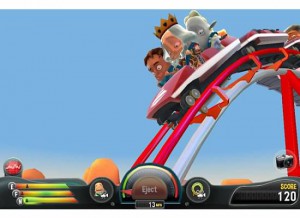
Coaster Crazy, a brand new app from Frontier Development, brings a whole new look to the world of roller coasters! Coaster Crazy is available on iOS devices only. This 3D roller coaster game will have you upside down with it's crazy antics and challenges that will push your roller coaster creativity to the max. Download Coaster Crazy Coaster Crazy begins by showing you how to navigate the game and introduces you to the world of Coaster Crazy. You begin by purchasing land and building a roller coaster. Before you can begin making money on your coaster, though, you have to appease the Crazies. The Crazies are your test subjects, and each of them have specific demands on how your coaster performs. If they don't like it, you can't run it. By completing all objectives that the Crazies set, you can open your coaster and begin making money.
In order to complete all of the Coaster Crazy objectives, you have to make adjustments to your design. Add a loop here, make a drop bigger; all of these adjustments make your Crazies happy and lets you make money!
The better off your coasters do, the better off you are-- each coaster that meets the requirements earns cash, which allows you to buy more land to build more coasters! Build as many coasters as you can to become the Coaster Crazy king! Cover the world in your roller coaster creations; locations for coasters include Australia, United States of America, and more! The best part about this game (apart from the sheer awesomeness of it) is that it's free! While there are many things you can purchase in game, like others worlds and locations (like the Moon!), basic game play is free. Send your Crazies on the ride of their lives! Coaster Crazy is a fun and free game with awesome 3D graphics that lets you control your own roller coaster empire. Fun for all ages, everyone is sure to have a good time playing Coaster Crazy! Check back to CoolAppsMan.com for all the latest app reviews, hints, and walkthroughs to all your favorite apps.
Images from this guide

Community discussion(4)